2014年2月7日 星期五

How to use Chrome Remote Desktop

0 Prerequisites
0.1 Install Google Chrome.

0.2 Sign in with Google Account.


1. Install Chrome Remote Desktop
1.1 Go Chrome Webstore. Search "Remote Desktop". Click [+ Free].

2. Run Chrome Remote Desktop
2.1 Go chrome://apps. Click Chrome Remote Desktop

2.2 For first using, you need to authorize your computer. Click [Continue].

2.3 Click [Accept].

2.4 Click [Get started].

2.5 Click [Share].

2.6 Give the access code to the person who will be assisting you.


3. Run Chrome Remote Desktop to help
3.1 Go chrome://apps. Click Chrome Remote Desktop.

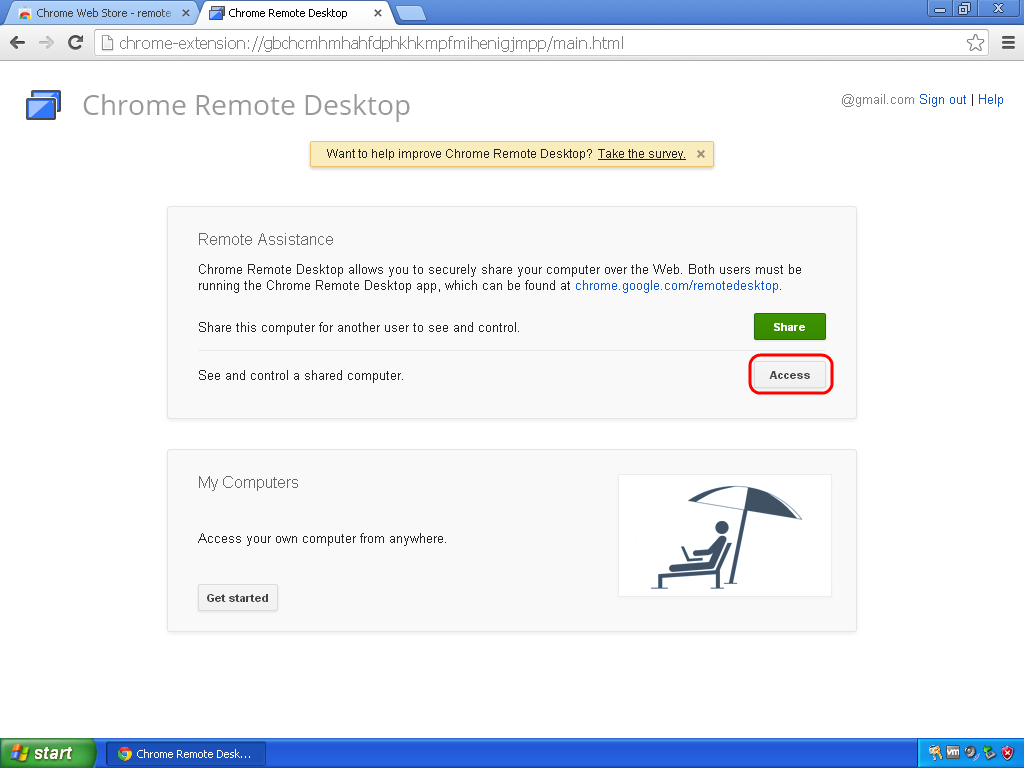
3.2 Click [Access] and input the access code.


2013年12月3日 星期二

Use "Computer Management" to control Hyper-V Server

If you want to use "Computer Management" to control your Hyper-V Server:

You may received following warning message "Computer xxx cannot be managed. ...":

You need to enable couple Firewall rules:
1. Open "Windows PowerShell".

2. Enable Firewall rules.
    "Enable-NetFirewallRule -DisplayGroup "Remote Event Log Management"
    "Enable-NetFirewallRule -DisplayGroup "Windows Firewall Remote Management"
    "Enable-NetFirewallRule -DisplayGroup "Remote Volume Management"

3. If need to remote control Disk Management, need to enable host Firewall rules.

4. Enable Firewall rules.

5. Now you can see your Hyper-V Server's disks.

2013年11月19日 星期二

VMware Player & vmnetcfg.exe

VMware Player is a very useful tool for evaluating software products. However, if you want to create a LAN lab, you'll need vmnetcfg.exe which you can find in VMware Workstation.

First, please make sure VMware Player and VMware Workstation are the last versions.

1. Run "Command Prompt".
2. Change directory to your download folder.
3. Type "VMware-workstation-full-10.0.1-1379776.exe /e .\temp".
4. Change directory to \temp folder.
5. Type "expand core.cab -F:vmnetcfg.exe .".
6. Type "expand core.cab -F:_vmnetcfglib.dll .".
7. Change file name "_vmnetcfglib.dll" to "vmnetcfglib.dll".
8. Copy "vmnetcfg.exe" and "vmnetcfglib.dll" to VMware Player installed folder. (default: C:\Program Files (x86)\VMware\VMware Player)
9. Run "vmnetcfg.exe".

2013年8月27日 星期二

How to setup CISCO QuickVPN?

RV042 10/100 4-Port VPN Router
Click [VPN] –> [VPN Client Access] from left sidebar.
1. Create Username and Password and click [Add to list].
2. Click [Generate] for generating a new Certificate.
3. Click [Export for Client] and save the file to the folder where QuickVPN installed. (Default: “C:\Program Files (x86)\Cisco Small Business\QuickVPN Client”)
4. Click [Save].

CISCO QuickVPN
Install QuickVPN Client
1. Download “QuickVPN Client for all Small Business Routers“.
2. Unzip and install.

Run QuickVPN Client
Type “User Name” and “Password”. Type router’s IP address at “Server Address”. Click [Connect].

How to setup Windows 8 VPN?

Create VPN Connection
1. [Win]+[x] –> “Control Panel” –> ”Network and Internet”

2. Click “Network and Sharing Center”.

3. Click “Set up a new connection or network”.

4. Select “Connect to a workplace”.

5. Select “Use my Internet connection (VPN)".

6. Type your VPN Server Internet address and Destination name. Click [Create].

Use VPN Connection
1. [Win]+[i] –> Network

2. Click [Connect] and type your User name and Password.


2013年6月3日 星期一

OpenCart : Add Order Acceptance Policy when Checkout


1. Add a variable at catalog/language/english/checkout/checkout.php
$_['order_acceptance_policy'] = "<h3>Order Acceptance Policy</h3><p>This order acknowledgement is not a contract and does not constitute an acceptance of your order; but only a record of your offer to purchase a particular item at a particular price.</p>";

2. Find "$this->data['totals'] = $total_data;" in catalog/controller/checkout/confirm.php. Add one line:
$this->data['totals'] = $total_data;
$this->data['order_acceptance_policy'] = $this->language->get('order_acceptance_policy');

3. Find "<div class="payment"><?php echo $payment; ?></div>" in catalog/view/theme/your-theme/template/checkout/confirm.tpl. Add one line before:
<?php echo $order_acceptance_policy; ?>
<div class="payment"><?php echo $payment; ?></div>